

Introducing AppScreen Studio 4.0
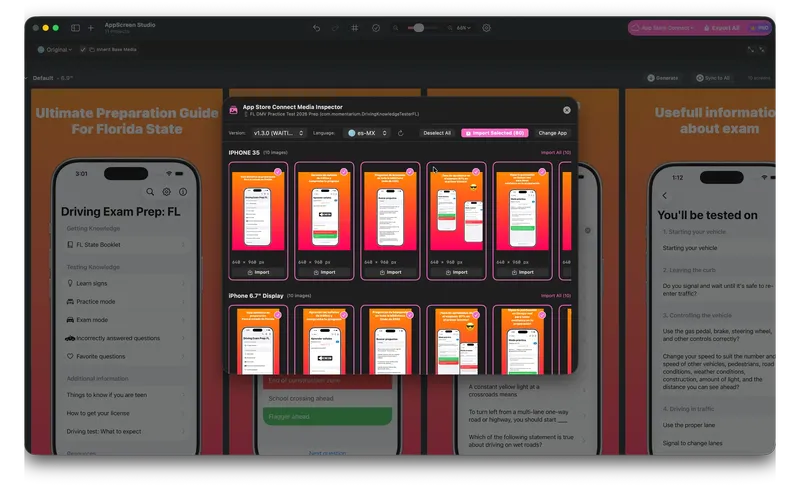
Preparing App Store screenshots is one of the most tedious parts of shipping iOS and macOS apps. When your app supports 10+ languages and multiple device display sizes, you end up manually exporting and dragging hundreds of files into App Store Connect.
Today, we’re excited to launch AppScreen Studio 4.0.0 — our biggest update yet, designed to automate this entire workflow and save you hours on every release.
⚡ 1. Direct App Store Connect Upload in 1 Click
No more downloading files locally and manually dragging them into your browser! AppScreen Studio now connects directly with the App Store Connect API.
- 1-Click Direct Upload: Authenticate securely using your API Key (
.p8) and push generated screenshots directly to App Store Connect Media Manager. - Selective Sync: Choose whether to upload all screenshots or sync only specific languages, display sizes, or individual panels.
- Real-Time Progress: Watch live progress bars and status indicators as each screenshot renders and uploads.
- Smart Replace Option: Safely clear old screenshots from App Store Connect before uploading new ones.
Refined canvas and editing experience
We’ve refined the canvas and editing experience to feel even more native to macOS:
- Redesigned Toolbar: A cleaner, more intuitive top navigation bar with unified App Store Connect menus.
- Precision Zoom: Extended zoom slider with fine-grained controls, stepper buttons, and instant preset shortcuts (25%, 50%, 100%, 200%).
- Panel Reordering: Easily adjust panel order on the canvas using simple arrow controls (
←/→).
Multilingual screenshot design
Multilingual screenshot design has reached a whole new level of control:
- 15+ New Languages: Expanded translation support to help you localize and launch in global markets effortlessly.
- Per-Locale Layer Isolation: Layers added within a specific language stay strictly isolated to that locale without cluttering your “Original” (Base) design or leaking into other languages.
- Original Language Switcher: Jump back to your master “Original” layout anytime from the translation menu.
- Localized App Interface: AppScreen Studio’s own interface is now translated into 15+ languages (switchable directly in App Settings).
Bulk App Store Import
Need to redesign an existing app or migrate layouts from a live build?
With Bulk App Store Import, you can inspect live or draft listings from App Store Connect and import all existing screenshots for any selected locale directly onto your workspace panels in seconds.
Discover our companion tools
In App Settings, check out the new “Our Apps” section to discover our companion tools built specifically for iOS/macOS developers and indie hackers:
- StoreSync — ASO rank tracker, metadata manager, and store compliance tool.
- PriceLocus — Optimize global app pricing & Purchasing Power Parity (PPP) across 175 App Store regions.
- CoreData Studio — A fast SQLite inspector and debugger for CoreData and SwiftData projects.